Ready Badge Designs: Personalise a Finished Badge in 60 Seconds
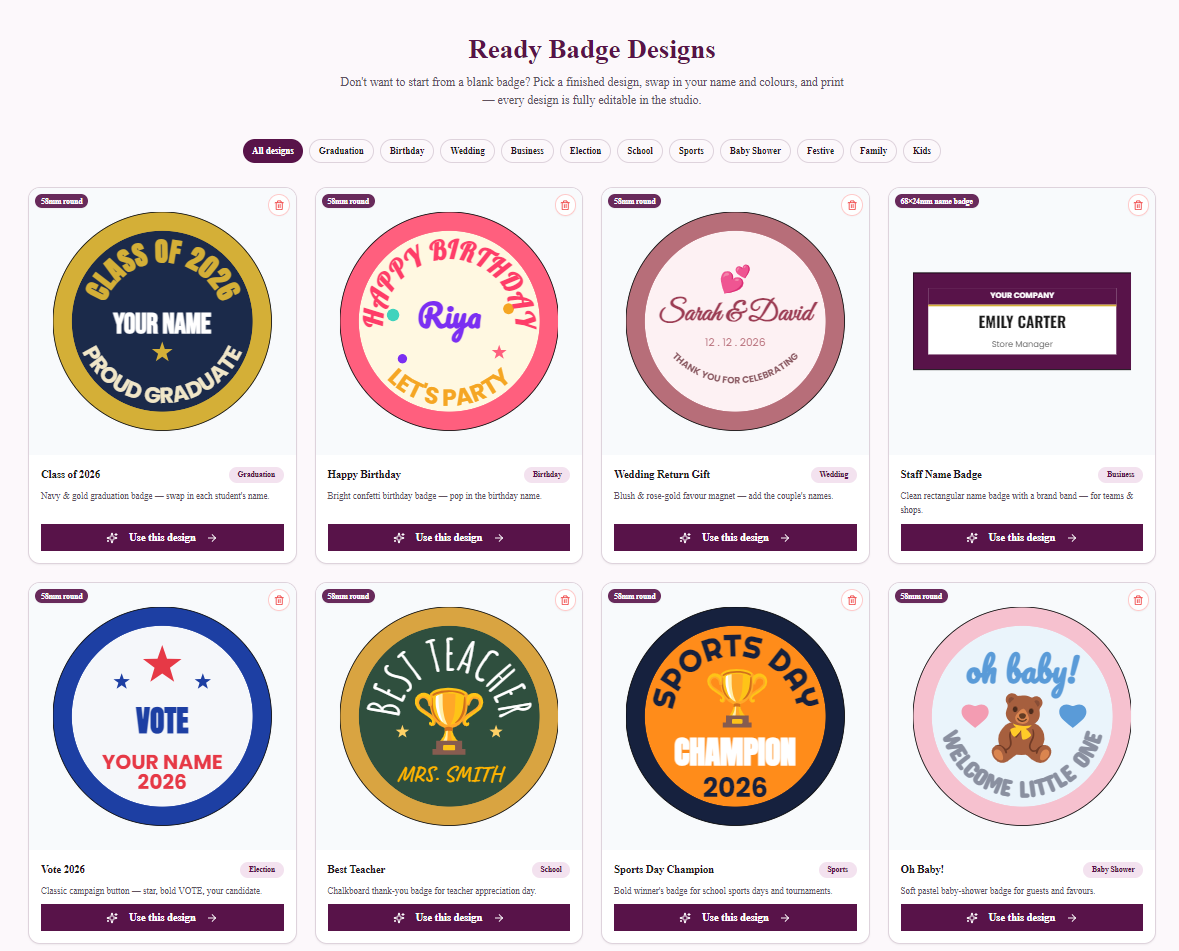
Not everyone wants to start from a blank badge. The Ready Designs gallery is a library of finished, professionally laid-out badges — curved titles hugging the rim, a sticker centrepiece, a name in the right spot — where all you do is swap in your own name and print.
What's in the gallery
- Birthday — confetti badges and a cake design with the name and age.
- Wedding — blush & rose-gold return-gift magnets with the couple's names.
- Graduation — the classic navy-and-gold "Class of 2026" pin.
- School & Sports — Best Teacher, Sports Day Champion, Cricket, Football.
- Festive & Family — Christmas, Super Dad, heart-shaped Best Mom.
- Kids & more — unicorns, astronauts, name badges for staff.
Filter by category, and every card shows the exact size (58mm round, heart, 68×24mm…).
How it works (three taps)
- Pick a design in the gallery and hit Use this design — it opens in the studio on the correct template sheet.
- Tap ✏️ Edit on the badge and change the name — fonts, colours, stickers and layout are all editable; nothing is locked.
- Print or download your 300 DPI sheet. Printing ready designs is included with the Business Plus and Business Pro plans — everyone else can browse and preview the full gallery.
For badge businesses: ready designs are a menu. Show the gallery at your stall — "pick one, give me a name" — and you can press personalised badges with zero design time per customer.
Why they look professional
Every design follows the layout rules that make badges read well: top text arcs at the rim's curve, centrepieces sized to ~a third of the face, bottom arcs mirrored to the top, nothing in the trim zone. You get the polish without knowing the rules — and because everything stays editable, you can learn by poking at them.
Start with a finished badge: browse the Ready Designs gallery.
Frequently Asked Questions
Can I edit a ready design or only change the name?
Everything is editable — names, fonts, colours, stickers, layout, even the badge size. Ready designs are normal studio projects that start filled-in instead of blank.
Do ready designs cost extra?
Browsing and previewing the gallery is free for everyone. Printing or downloading a ready design is included with the Business Plus and Business Pro plans — there's no per-design charge on those plans.
What sizes do ready designs come in?
Most are 58mm round badges (the most popular press size), plus heart-shaped badges, 68×24mm name badges, and 50×50mm square and 90×65mm rectangular fridge magnets. Each opens on its standard template sheet, and you can change paper size and quantity as usual.