Button Badge Sizes: Complete Chart in mm and Inches
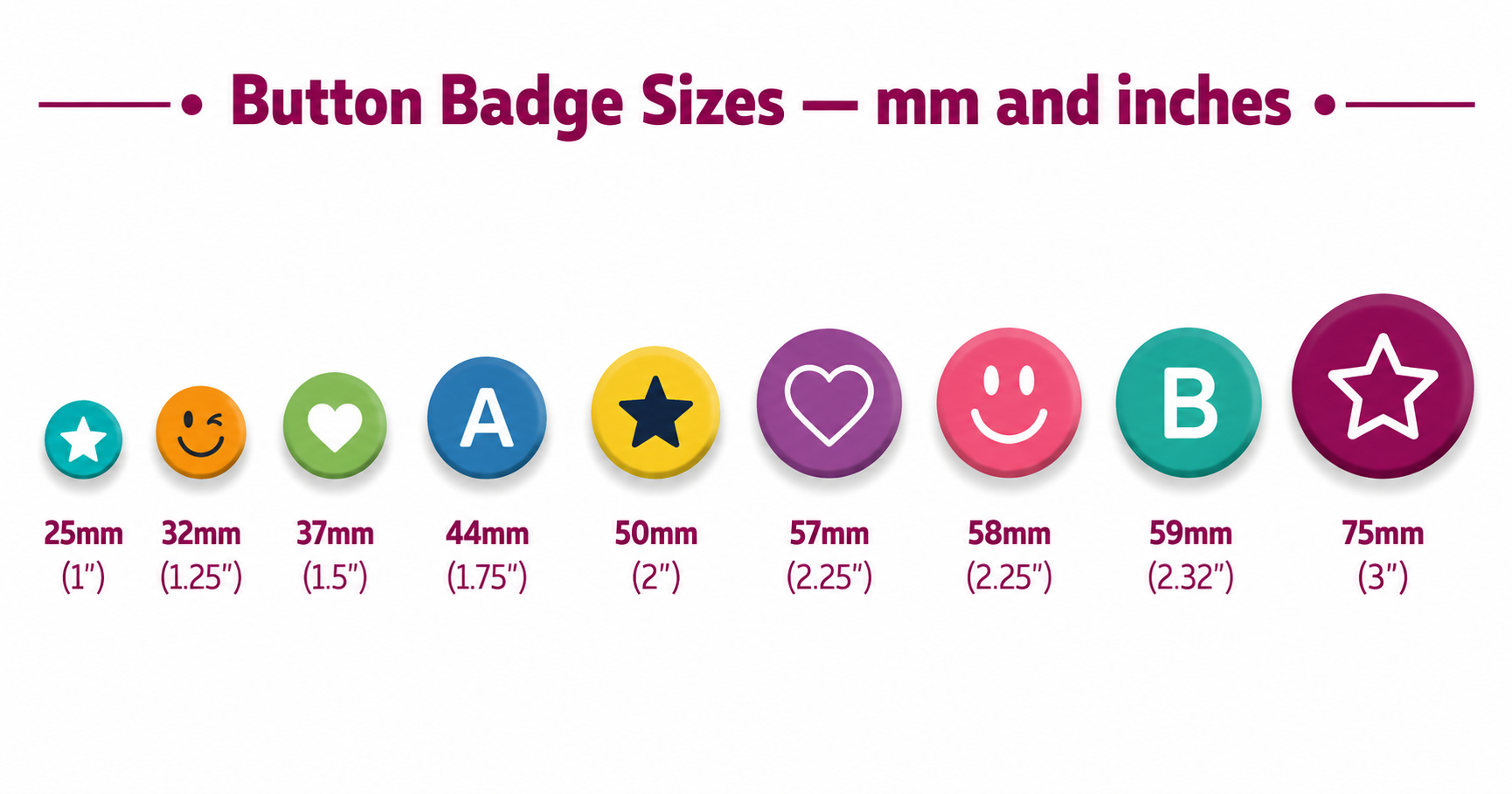
Standard button badge sizes run from 25mm (1 inch) to 75mm (3 inches), measured across the finished front face — and the most popular size worldwide is 58mm (2.25 inches). Sizes are quoted in millimetres in the UK, Europe and Australia and in inches in the US and Canada, which is why "58mm" and "2¼ inch" turn out to be the same badge.
Button badge size chart: mm, inches and cut size
| Badge size | Exact inches | Sold as | Cut size (artwork) |
|---|---|---|---|
| 25mm | 0.98" | 1 inch button | 35mm |
| 32mm | 1.26" | 1.25 inch button | 44mm |
| 37mm / 38mm | 1.46" / 1.50" | 1.5 inch button | 49mm / 51mm |
| 44mm | 1.73" | 1.75 inch button | 54mm |
| 50mm | 1.97" | 2 inch button | 60mm |
| 57mm | 2.24" | 2.25 inch button (US, Japan) | 67mm |
| 58mm | 2.28" | 2.25 inch button (UK, EU) | 70mm |
| 59mm | 2.32" | 2.3 inch button (EU presses) | 69mm |
| 75mm | 2.95" | 3 inch button | 85mm |
The badge size is the finished front face; the cut size is the larger circle you print and cut, because the paper wraps around the badge edge and tucks behind. The cut sizes above are the defaults in our free templates, and both diameters stay adjustable if your press manufacturer's spec differs.
How big is a 25mm badge?
A 25mm badge measures 25mm (0.98 inches) across the finished face and is sold as a 1 inch button — the smallest standard size, about the diameter of a UK 10p or US quarter. Artwork is printed and cut at 35mm so the paper wraps around the edge.
Best for collector sets and band merch: the free 25mm template fits 42 badges on one A4 sheet and matches Tecre 100, Badge-A-Minit and VEVOR 25mm presses.
How big is a 32mm badge?
A 32mm pin badge measures 32mm (1.26 inches) across and is sold as a 1.25 inch button. It sits between the tiny 25mm collector size and the 44mm name badge size — big enough for a short word or a small logo. Artwork is cut at 44mm.
The free 32mm template lays out 24 badges per A4 sheet and matches Tecre 125, VEVOR 1.25" and Badge-A-Minit presses.
How big is a 37mm or 38mm badge?
A 37mm badge measures 37mm (1.46 inches) across and is sold as a 1.5 inch button; German-made presses such as Badgematic use a 38mm (1.50 inch) face instead. The default cut size is 49mm for 37mm machines and 51mm for 38mm machines.
The free 37mm template ships with the 49mm cut used by VEVOR and other worldwide 1.5 inch presses; owners of 38mm Badgematic machines can switch both diameters in seconds.
How big is a 44mm badge?
A 44mm pin badge measures 44mm (1.73 inches) across and is sold as a 1.75 inch button. It is the professional name badge size — room for a name and a logo without dominating a shirt. Artwork is printed and cut at 54mm.
The free 44mm template fits 15 badges per A4 sheet and matches Tecre 175, VEVOR 44mm, ChiButtons and Badge-A-Minit 1.75" presses.
How big is a 50mm badge?
A 50mm badge measures 50mm (1.97 inches) across and is sold as a 2 inch button. It is a popular European size for photo badges and larger logos, pressed on Badgematic and generic 50mm machines. The default cut size is 60mm.
The free 50mm template lays out 12 badges per A4 sheet, with both diameters adjustable to your press spec.
How big is a 57mm badge?
A 57mm badge measures 57mm (2.24 inches) across — the exact metric equivalent of a 2.25 inch button, since 2.25 inches is 57.15mm. It is the standard can badge size in Japan and on many US 2.25 inch presses. Artwork is cut at 67mm.
The free 57mm template ships with the 67mm cut line; Japanese can badge presses vary in cut size, so both diameters are adjustable.
How big is a 58mm badge?
A 58mm badge measures 58mm (2.28 inches) across and is sold as a 2.25 inch button. It is the most popular badge size in the world — the standard in the UK, Europe and Australia, and the default on the most affordable presses. Artwork is cut at 70mm.
The free 58mm template fits 12 badges per A4 sheet with the 70mm cut line already drawn in.
How big is a 59mm badge?
A 59mm badge measures 59mm (2.32 inches) across, a European size used by German-made Badgematic presses. It is easy to confuse with 58mm, but the two are not interchangeable, so check your machine's spec sheet before printing. The default cut size is 69mm.
The free 59mm template matches the Badgematic spec, and both diameters are adjustable for other 59mm machines.
How big is a 75mm badge?
A 75mm badge measures 75mm (2.95 inches) across and is sold as a 3 inch button — the giant statement size used for photo buttons, fan merch and anime can badges. Artwork is cut at 85mm on standard 75mm presses; Tecre 3 inch models are 76mm-class.
The free 75mm template fits 6 badges per A4 sheet; both diameters are adjustable for 76mm machines.
Is 58mm the same as 2.25 inches?
Close enough that the industry treats them as one size. 2.25 inches is exactly 57.15mm — so a 57mm press (common in the US and Japan) and a 58mm press (common in the UK and Europe) are both marketed as "2¼ inch". The one thing that matters: use the template that matches your press, because a 58mm design pressed in a 57mm machine leaves a sliver of white at the edge. Our 58mm template and 57mm template are sized separately for exactly this reason.
What is the cutting size for a button badge?
The cutting size is the diameter your artwork is printed and cut at — larger than the finished badge, because the paper wraps around the edge and tucks behind (the bleed). It is typically 10–12mm wider: a 58mm badge cuts at 70mm, a 25mm badge at 35mm.
You do not need to calculate any of this. Every template in our template hub draws the cut line, bleed ring and safety zone for its size automatically, and exports a print-ready 300 DPI PDF laid out on US Letter, A4, A3 or A3+ paper.
Which size should you choose?
- Already own a press? The size on the box decides for you — a 58mm machine only presses 58mm badges, so pick the template that matches it exactly.
- Selling band or fan merch? 25mm (1") is the collector classic — cheap to make, easy to wear in numbers.
- Making name badges for an event or staff? 44mm (1.75") fits a name and a logo legibly.
- Want one safe default? 58mm (2.25") is the most popular badge size in the world — big enough for photos and slogans, standard on the most affordable presses.
- Fridge magnets rather than pins? See the 50×50mm square (about 2 × 2 inches) and 90×65mm rectangular (about 3.5 × 2.5 inches) magnet templates.
Free print-ready templates for every size
Pick your size in the template hub, upload your artwork or add text, and download a PDF with the correct bleed, safety zone and cut lines already in place — sized for your press, in millimetres and inches.
Frequently Asked Questions
What size is a 58mm badge in inches?
58mm is 2.28 inches — sold as a 2.25 inch (2¼") button in the United States. It is the most popular badge size worldwide.
What is the standard button badge size?
The most common size is 58mm (2.25 inches) in the UK and Europe, and its 57mm twin in the US — both marketed as 2¼ inch. For name badges, 44mm (1.75 inches) is the professional standard.
What size is a 32mm pin in inches?
32mm is 1.26 inches, sold as a 1.25 inch (1¼") button in the US.
What size is a 1 inch button in mm?
A 1 inch button is 25mm (25.4mm exactly). It is the smallest standard badge size, popular for band merchandise and collector pins.
What is the cutting size for a 58mm badge?
Around 70mm, depending on your press manufacturer — the extra ring is the bleed that wraps around the badge edge. A template with built-in cut lines handles this automatically.