QR Code Badges: Make Scannable Name Badges and Event Pins
A QR code badge turns a pin or name badge into something people can act on: scan a conference badge to open a LinkedIn profile, a staff badge to open the menu or a feedback form, an event pin to open the schedule. Here is what works, what scans reliably at badge sizes, and how to make one.
What people put behind the code
- Networking badges — a LinkedIn profile or digital business card, so nobody types a name into a search bar mid-conversation.
- Event pins — the schedule, venue map or ticket page for the day.
- Staff badges — a menu, a booking page, a "rate your visit" form.
- Product and promo pins — a discount code or campaign landing page you can update after the badges are pressed, if the URL points somewhere you control.
Will a QR code scan at badge size?
Yes — with two rules. Go 44mm (1.75") or larger: a code needs physical space, and on the bigger sizes a phone reads it from a natural conversation distance. And keep the URL short: the less text a QR code encodes, the coarser and more scannable its grid. A short link scans at sizes a 200-character URL will not. Strong contrast helps too — a dark code on a light background beats anything decorative.
How to make one
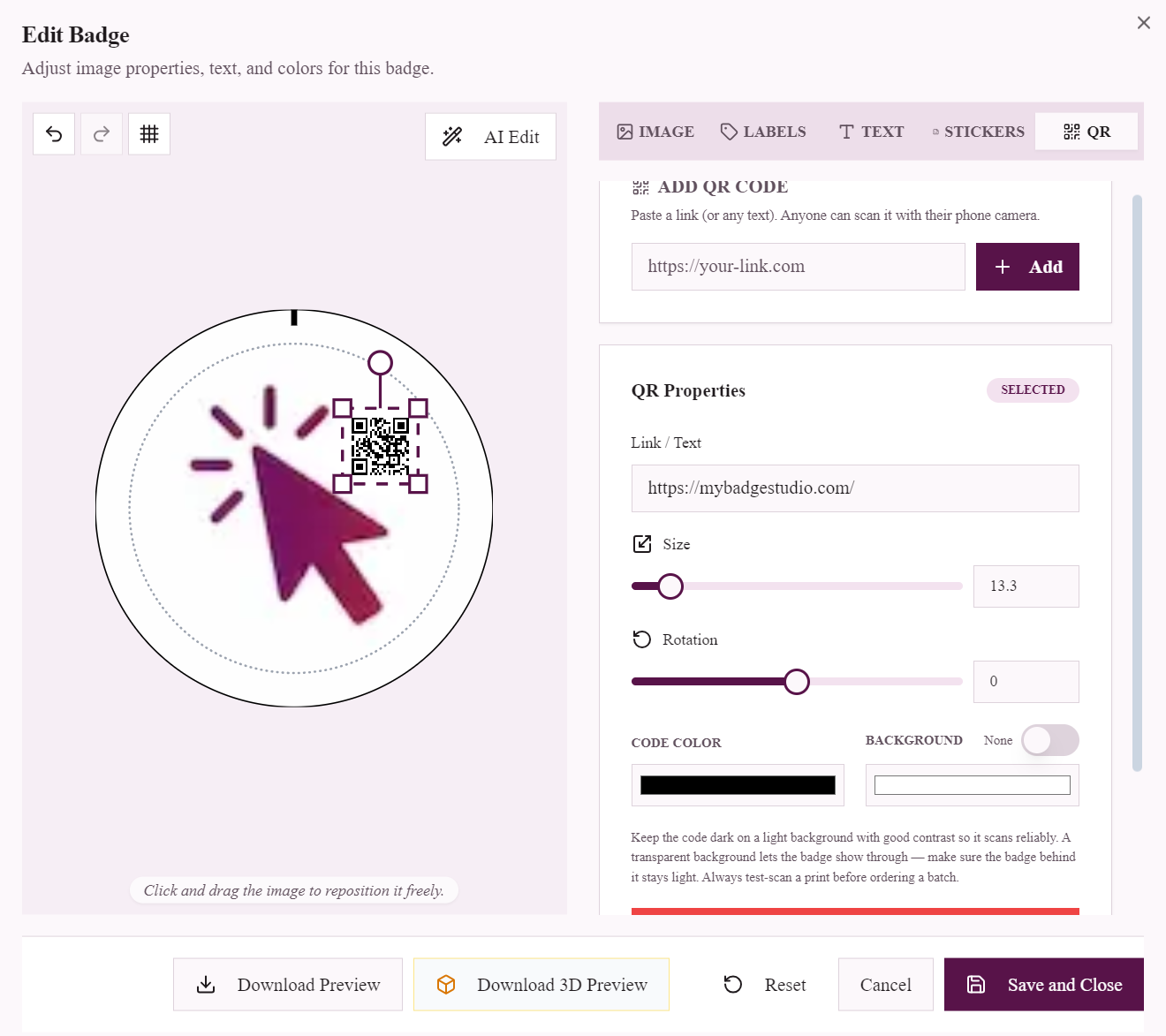
In the badge maker, pick your badge size, open the QR tab, and type the URL or text the code should open. The code renders as a crisp vector on the badge preview — drag to position it, resize it, recolour it to match the design, and add your text and images around it. The exported PDF keeps it at full print resolution with the usual bleed and cut lines, so it scans as cleanly off the pressed badge as it does on screen.
QR codes are part of the Business Plus and Business Pro plans, which also cover the client-submission portal — the combination event organisers tend to want anyway.
Real setups that work
- Conference organisers press one QR badge per attendee linking to the event app — the badge is the lanyard card's backup that never runs out of battery.
- Market stallholders wear a 58mm badge linking to their online shop; buyers who "want to think about it" scan instead of taking a card they will lose.
- Cafés and food trucks put the loyalty signup or menu behind a staff badge — the person taking the order IS the sign-up point.
- School open days give volunteers badges linking to the enrolment page, so every conversation ends with a scan rather than a paper form.
One tip worth stealing
Point the code at a URL you control — a page on your own site, or a short link you can re-target. The badge is pressed forever; the destination does not have to be. A batch of event pins can point at this year's schedule today and next year's after that, without pressing a single new badge.
Frequently Asked Questions
Can you put a QR code on a button badge?
Yes. Add the QR code in the badge maker, position and resize it on the design, and export a print-ready PDF. On a pressed badge, codes scan reliably from 44mm (1.75 inches) upwards with a short URL.
What is the best badge size for a QR code?
44mm (1.75") or larger. 58mm (2.25") gives the most comfortable scan distance and leaves room for a name or logo alongside the code.
Do QR code badges work for name badges?
They are one of the most popular uses — the code links to a LinkedIn profile or digital business card, so new contacts scan instead of typing a name.