Add Stickers to Your Badges — 97 Built-In Designs
Sometimes a badge needs more than text — it needs a birthday cake, a trophy, a unicorn or a diya lamp. My Badge Studio now includes a built-in library of 97 colourful stickers you can drop onto any badge or fridge magnet with one tap. No hunting for clip-art, no copyright worries, no uploads needed.
What's in the library
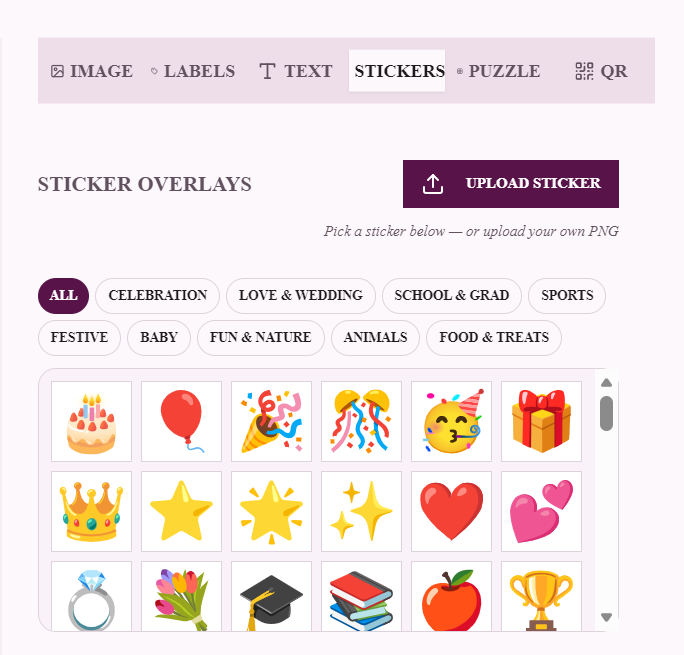
Open the Stickers tab in the badge editor and you'll find the full grid, organised into ten categories:
- Celebration — birthday cake, balloons, party popper, confetti, gift, crown, piñata, carousel
- Love & Wedding — hearts, ring, rose, dove, love letter, wedding chapel
- School & Grad — graduation cap, books, pencil, backpack, microscope, telescope, DNA, globe and a full classroom set (23 stickers — the biggest category)
- Sports — trophy, gold/silver/bronze medals, football, cricket, tennis, volleyball, badminton
- Festive — fireworks, sparkler, diya lamp, Christmas tree, Santa, snowman, red lantern, nazar amulet
- Baby — teddy bear, baby bottle, chick
- Animals — panda, lion, elephant, turtle, T-Rex, honeybee, ladybug, tropical fish
- Food & Treats — cupcake, donut, ice cream, lollipop, pizza, coffee
- Fun & Nature — unicorn, rainbow, rocket, sunflower, butterfly, crescent moon, shooting star and more
Every sticker is high-resolution vector art, so it prints razor-sharp at any badge size — from a 25mm pin to a 90×65mm magnet.
How to add a sticker (step by step)
- Open your badge. In the Template Studio, hover your badge and click ✏️ Edit.
- Go to the Stickers tab. The library grid loads with category filters across the top.
- Tap any sticker — it drops onto your badge at a sensible size.
- Position it. Drag it on the preview to move it; use the zoom and rotation sliders to fit your layout.
- Add more, or copy one. Stack multiple stickers, and use Copy / Paste to duplicate a sticker you've already styled.
Your own stickers, with AI background removal
Have your own artwork or logo? The Upload Sticker button accepts transparent PNGs. And if your image has a solid background, tap Remove BG (AI) — one AI credit cuts the subject out cleanly so it layers over your badge like a real sticker.
Design in seconds: a top arc of curved text, a sticker centrepiece, and a name underneath is the fastest professional badge layout there is. Our Ready Designs use exactly this recipe.
Ideas to steal
- Birthday party pins — cake sticker + the birthday kid's name and age.
- Sports day — trophy or medal sticker + "CHAMPION" + the year.
- Diwali & festive gifting — diya lamp or fireworks on a deep purple magnet.
- Kids' badges — unicorn, T-Rex or panda with the child's name in a fun script.
- Teacher appreciation — red apple + "BEST TEACHER" arced over the top.
Tips
- One hero sticker at 30–40% of the badge face usually beats several small ones.
- Keep stickers inside the inner guide so nothing is lost when the badge is pressed.
- Match your colours — pick badge rim colours from the sticker's palette for a designed-on-purpose look.
- Sync across a batch — the Batch Sync option copies your sticker setup to every badge on the sheet.
Open the studio, hit the Stickers tab, and give your badges some personality — the library is free to design with.
Frequently Asked Questions
How many stickers are built into My Badge Studio?
There are 97 built-in stickers across ten categories — Celebration, Love & Wedding, School & Grad, Sports, Festive, Baby, Animals, Food & Treats and Fun & Nature — plus geometric shapes and 150+ line icons. You can also upload your own transparent PNG stickers.
Are the stickers free to use commercially?
Yes. The sticker artwork is openly licensed and free to use on badges and magnets you sell. Free-plan downloads carry a small mybadgestudio.com label; any paid plan removes it.
Can I upload my own sticker?
Yes — the Stickers tab has an Upload Sticker button for transparent PNGs. If your image has a background, the Remove BG (AI) button cuts the subject out cleanly for one AI credit.
Will stickers print clearly on small badges?
Yes. Every built-in sticker is vector art, so it stays sharp at any size — including 25mm and 32mm pins — in the preview, the 3D mockup and the 300 DPI print PDF.