Christmas Countdown Badges and Photo Ornaments: Advent Templates to Print
Two new kinds of Christmas templates in the Badge Designer: an Advent countdown of 24 round badges, one for each day from 1 to 24 December, and five photo ornaments for the year's firsts. Both are ready to personalise in minutes, and print on any round badge or magnet.
The Advent countdown: a badge for every day
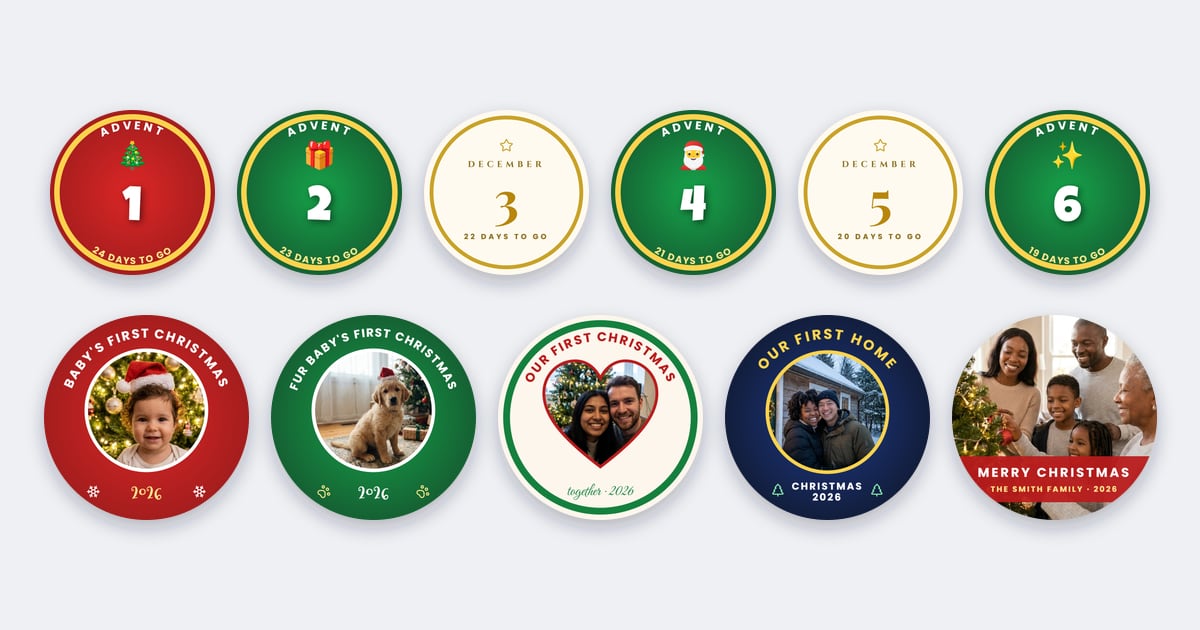
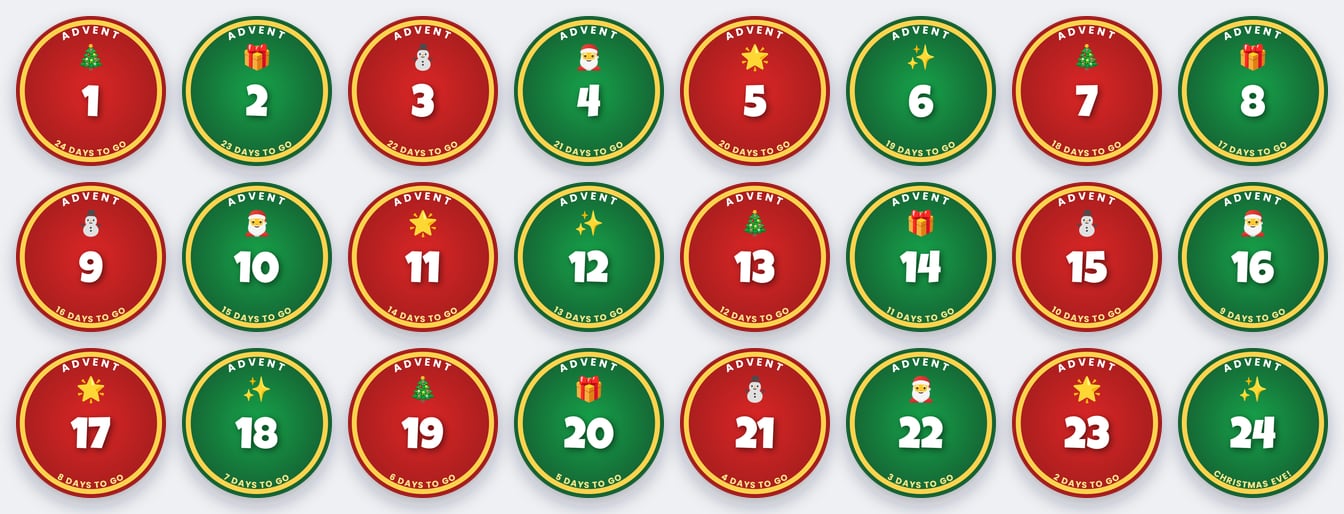
Each Advent set is one template with 24 pages, already numbered and counting down: day 1 says 24 days to go, and day 24 says Christmas Eve! There are three styles:
| Style | What it looks like |
|---|---|
| Christmas classic | Red and green days in turn with a gold rim, Advent round the top, a different sticker each day (a tree, a gift, a snowman, Santa, a star, sparkles) and the countdown round the bottom |
| Gold & white | Ivory with a thin gold line, a gold star, December, a big serif number and the countdown in small capitals |
| Photo | A photo for every day, December round the top and the date on a red disc: 24 favourite moments of the year |
Ways to use an Advent countdown
- Pin one a day on a felt board, a ribbon or a Christmas stocking. Children love pinning the day's badge each morning.
- Make them magnets and add a new one to the fridge every day.
- Fill a fabric Advent calendar, or 24 little bags, with a badge and a sweet in each.
- In the classroom, count down together, or give each child a day to reveal.
- The photo set makes a lovely grandparent gift: 24 moments from the family's year.
Making them to sell? Have sets ready by late November: families want them before 1 December.
Christmas photo ornaments
Five round photo designs, each with the year on it:
- Baby's first Christmas: red, a round photo, snowflakes and 2026.
- Our first Christmas: a heart-shaped photo and together · 2026, for couples.
- Our first home: night blue and gold, for a new house.
- Family Christmas: the photo fills the badge, with Merry Christmas and the family name on a red band.
- Fur baby's first Christmas: green with paw prints, for a new puppy or kitten.
Every word, colour and the year can be changed, so the family name, the baby's name or next year's date take seconds.
Turning a badge into an ornament
- Button badge: glue a loop of ribbon to the back, or thread a ribbon behind the pin, and hang it on the tree.
- Fridge magnet: a keepsake that stays up long after the decorations come down.
- Card ornament: print on thick card, cut out the circle, punch a hole at the top and tie a ribbon. The gift tag guide has tips on card, punches and ribbon.
Sizes
The Advent badges and ornaments are drawn for the 58 mm round badge and convert to every round size, from small 25 mm badges to big 75 mm ones. Twelve 58 mm badges fit on an A4 or US Letter sheet, so a whole Advent set prints on two sheets.
How to make them
- Open the Templates tab in the Badge Designer. The Advent sets and ornaments are in the Holidays group.
- Pick one and choose Use this template. An Advent set adds all 24 days as pages.
- Add your photos: tap the photo area, then Add a photo here. Use the page buttons to move from day to day.
- Make it yours: change the names, words, colours and the year.
- Print: choose Share, then Add to Studio, to send every page to the Template Studio at once and fill your sheets, or download a PDF of all the pages. Print at 100% / Actual size.
Want the ornament to play a video, such as the baby's first laugh? Add one with Video QR or a Live Photo. For more Christmas ideas, see Christmas badges and fridge magnets.
Which plans include these templates?
The Advent sets and photo ornaments are part of the Designer's ready-made templates, which come with Business Plus and Business Pro. Anyone can look through them in the Templates tab; on other plans, opening one explains how to upgrade. Compare plans on the pricing page.
Frequently Asked Questions
How many badges are in an Advent countdown?
24, one for each day from 1 to 24 December. Day 1 says 24 days to go, and day 24 says Christmas Eve!
What size are the Advent badges and ornaments?
They're drawn for the 58 mm round badge, which fits 12 to an A4 or US Letter sheet, so an Advent set prints on two sheets. They convert to every round size, from 25 mm to 75 mm.
Can I put my own photos on them?
Yes. The Photo Advent set has a photo for every day, and every ornament has a photo area. Tap it, then Add a photo here.
Can I change the names and the year?
Yes. Every word, colour and number is editable, so the family name, the baby's name or the year take seconds to change.
How do I hang a badge on the Christmas tree?
Glue a loop of ribbon to the back of a button badge, or thread a ribbon behind the pin. You can also print the design on thick card, cut out the circle, punch a hole and tie a ribbon.
Are the Christmas templates free?
No. The Advent sets and photo ornaments come with Business Plus and Business Pro. Anyone can browse them in the Designer's Templates tab.