2027 Photo Calendar Magnets: 6 Editable Templates, 12 Months Each
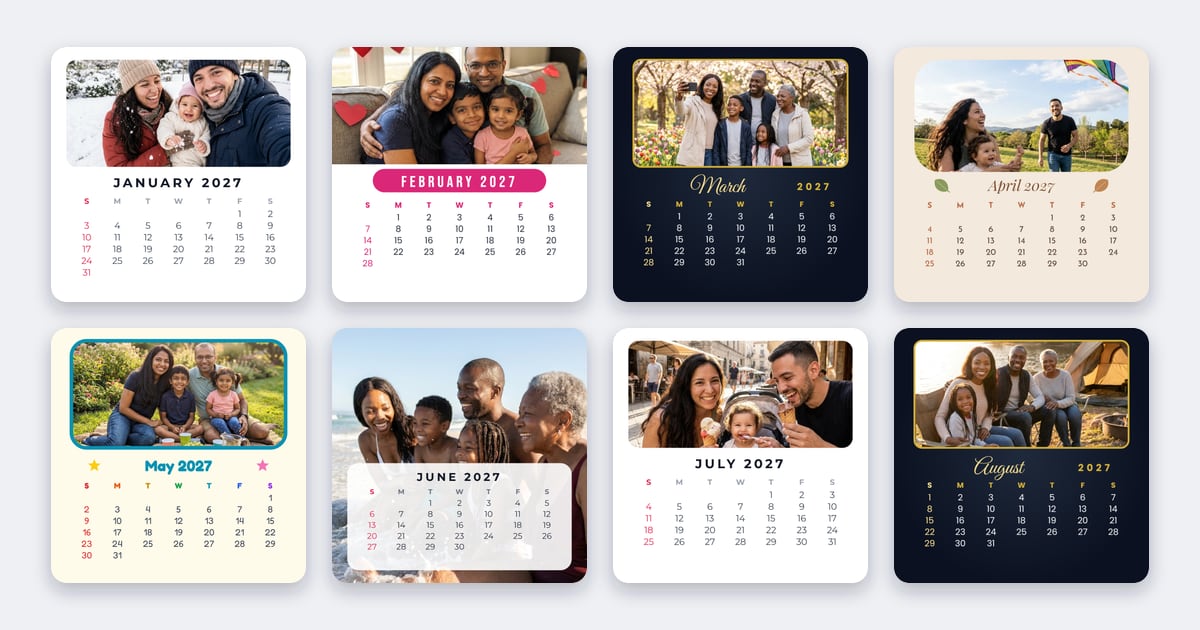
A photo calendar magnet is a gift that stays in sight all year: it lives on the fridge, and every month brings a new photo. The Badge Designer has six 2027 calendar templates for fridge magnets. Each one comes with all twelve months already laid out, so you only add your photos, and you can still change every colour, font and word.
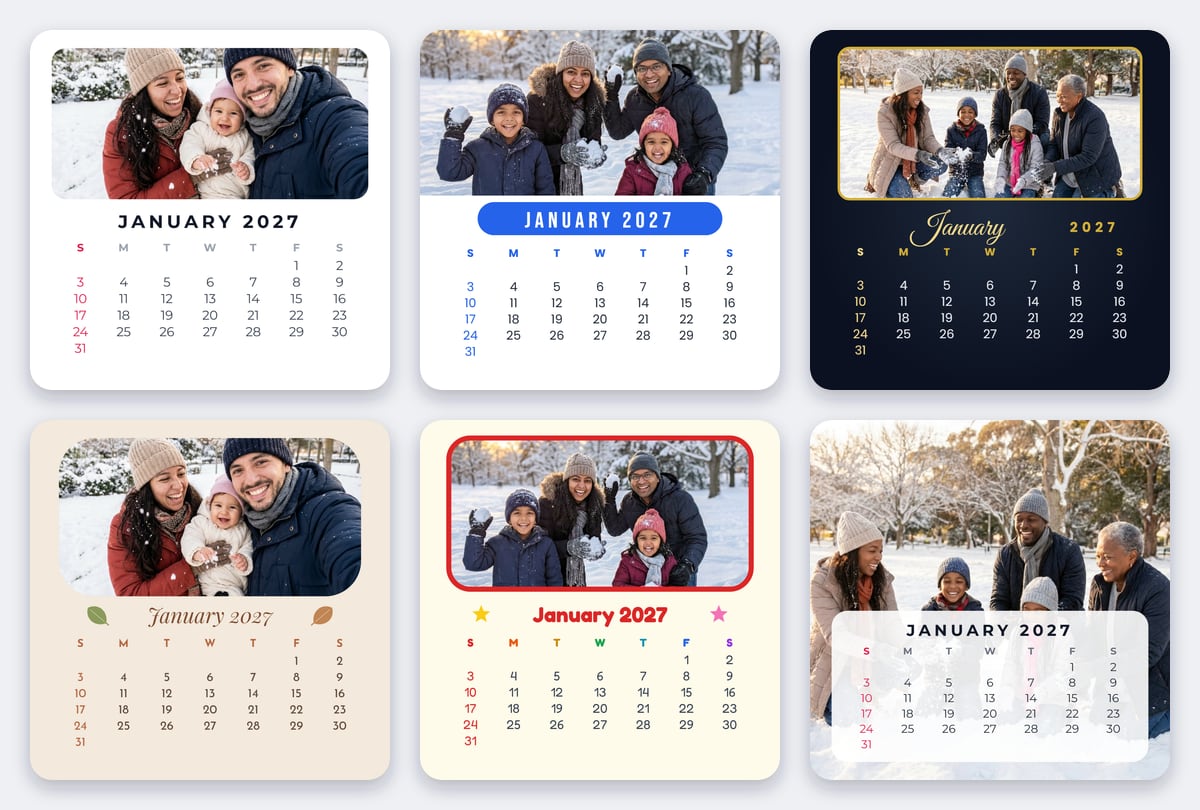
The six 2027 calendar styles
| Style | What it looks like | Good for |
|---|---|---|
| Classic | White, a clean month title, a rounded photo and red Sundays | Any photo; the safest gift |
| Bright months | An edge-to-edge photo and a colour of its own for every month | Cheerful, colourful years |
| Midnight gold | Night blue with gold, a script month name and a thin gold line round the photo | Elegant gifts, weddings and anniversaries |
| Boho | Warm sand, an italic month between two leaves, terracotta and olive | Outdoor, travel and natural-light photos |
| Kids rainbow | Cream with a coloured frame, two stars and rainbow weekday letters | Children's photos, gifts for grandparents, classrooms |
| Full photo | The photo fills the magnet, and the dates sit on a soft white panel over it | Big group photos and landscapes |
What's on each month
- A photo area, the month and year, the weekday letters and that month's 2027 dates, with Sundays picked out in colour.
- Weeks start on Sunday (S M T W T F S). In the Spanish Designer, the months are in Spanish and weeks start on Monday.
- Everything is ordinary text and shapes, so every colour, font and word stays editable. Each weekday's dates are one column of text, so the columns stay lined up whatever font you pick.
- Want to mark a birthday or an anniversary? Add a small heart or star from Icons on that date.
Size: 50 × 50 mm, or any square magnet
The calendars are drawn for the 50 × 50 mm square magnet. Twelve of them fit on one A4 or US Letter sheet, so the whole year prints on a single page. Prefer something bigger? Change the size to the 63.5 × 63.5 mm square (6 to a sheet), or any other square: the design converts with it.
How to make a 2027 photo calendar
- Open the Templates tab in the Badge Designer and choose the Calendars group.
- Pick a style and choose Use this template. All twelve months are added as pages, January to December.
- Add a photo to each month: tap the photo area, then Add a photo here. Use the page buttons to move from month to month, and drag or zoom each photo until it sits right.
- Change anything you like: colours, fonts, the words, or a name on every page.
- Print the year: choose Share, then Add to Studio, to send all twelve months to the Template Studio at once, ready to fill a sheet. Or choose Download for a PDF of all 12 pages, each at its exact size.
- Print at 100% / Actual size, then make your magnets.
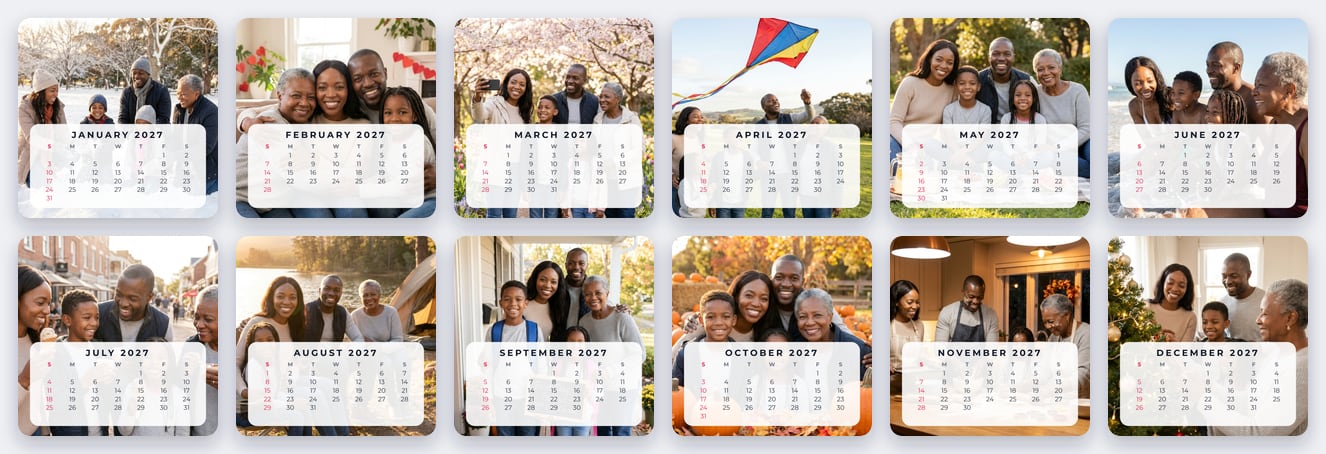
Photo tips
- Keep faces near the middle. On most styles the photo area is wide and short, so heads close to the top edge get cut. Drag the photo down a little if they do.
- Match the seasons: snow for January, flowers in spring, the beach in summer, pumpkins in October, the tree in December.
- One person per month makes a sweet gift for grandparents, with a month for each grandchild.
- Sharp, bright photos print best. A phone photo is plenty for a 50 mm magnet. See photo magnets from your own pictures.
Gift and selling ideas
- Christmas gifts for grandparents, godparents and teachers: the year ahead with the year's best photos.
- Personalised calendar sets to sell: the customer sends twelve photos and you print the set, boxed or on a backing card.
- Business giveaways: your products or your team, one month at a time, with your logo on every magnet.
- Want each month to play a video too? Add one with Video QR or a Live Photo.
Selling magnets? Read how to start a fridge magnet business.
Which plans include the calendar templates?
The 2027 calendars are part of the Designer's ready-made templates, which come with Business Plus and Business Pro. Anyone can look through them in the Templates tab; on other plans, opening one explains how to upgrade. Compare plans on the pricing page.
Frequently Asked Questions
What size is a calendar fridge magnet?
The templates are drawn for a 50 × 50 mm (about 2 inch) square magnet, so all twelve months fit on one A4 or US Letter sheet. They convert to any square size, such as the 63.5 × 63.5 mm (2.5 inch) magnet.
Can I change the colours, fonts and words?
Yes. Every month is made of ordinary text and shapes, so you can change any colour, font or word, and move or zoom each photo.
Do the weeks start on Sunday or Monday?
On Sunday in English. In the Spanish Designer, the month names are in Spanish and the weeks start on Monday.
How do I print all twelve months at once?
Choose Share, then Add to Studio, to send all twelve months to the Template Studio together and fill a sheet. Or download a PDF of all 12 pages, each at its exact size.
Are the 2027 calendar templates free?
No. The calendar templates come with Business Plus and Business Pro. Anyone can browse them in the Badge Designer's Templates tab.